Microsoft 365 Copilot · Free decision flow
Who gets a Copilot seat, and what the metered layer adds
One page, four lanes, two gates. The flow a seat request should travel before anyone assigns it, and what the spend looks like on the other side.
One click, two tabs: the download page opens here, and the AI at Work signup (two issues a month, unsubscribe anytime) opens alongside. The flow is free; joining the list is the fair trade.
Gate one
A named weekly task, or nothing
The requester names the repeating job, who receives the output and how often it runs. "Writing" is not a task. "The Monday operations summary that goes to the site leads" is a task. A request that arrives as a list of names with no tasks attached goes back before the review starts, which is the cheapest moment there will ever be to say no.
Gate two
Data scope, before the seat
A seat inherits whatever the person can already reach, so the question is not what the tool does, it is what this person can already open. Sites and repositories in reach, sensitivity labels actually applied, retention in force, and a named reviewer with a date. Checked before assignment, never after, because widening access later is a second decision nobody schedules.
The spend
A standing line, plus an additive layer
The metered layer sits on top of the seat, it does not replace it. A seat is a fixed monthly line. Metered usage is a separate layer an administrator switches on, billed in Copilot Credits on top of the seat already there. Both can be true for the same person in the same month, which is why every seat on the flow carries a budget owner and a review date.
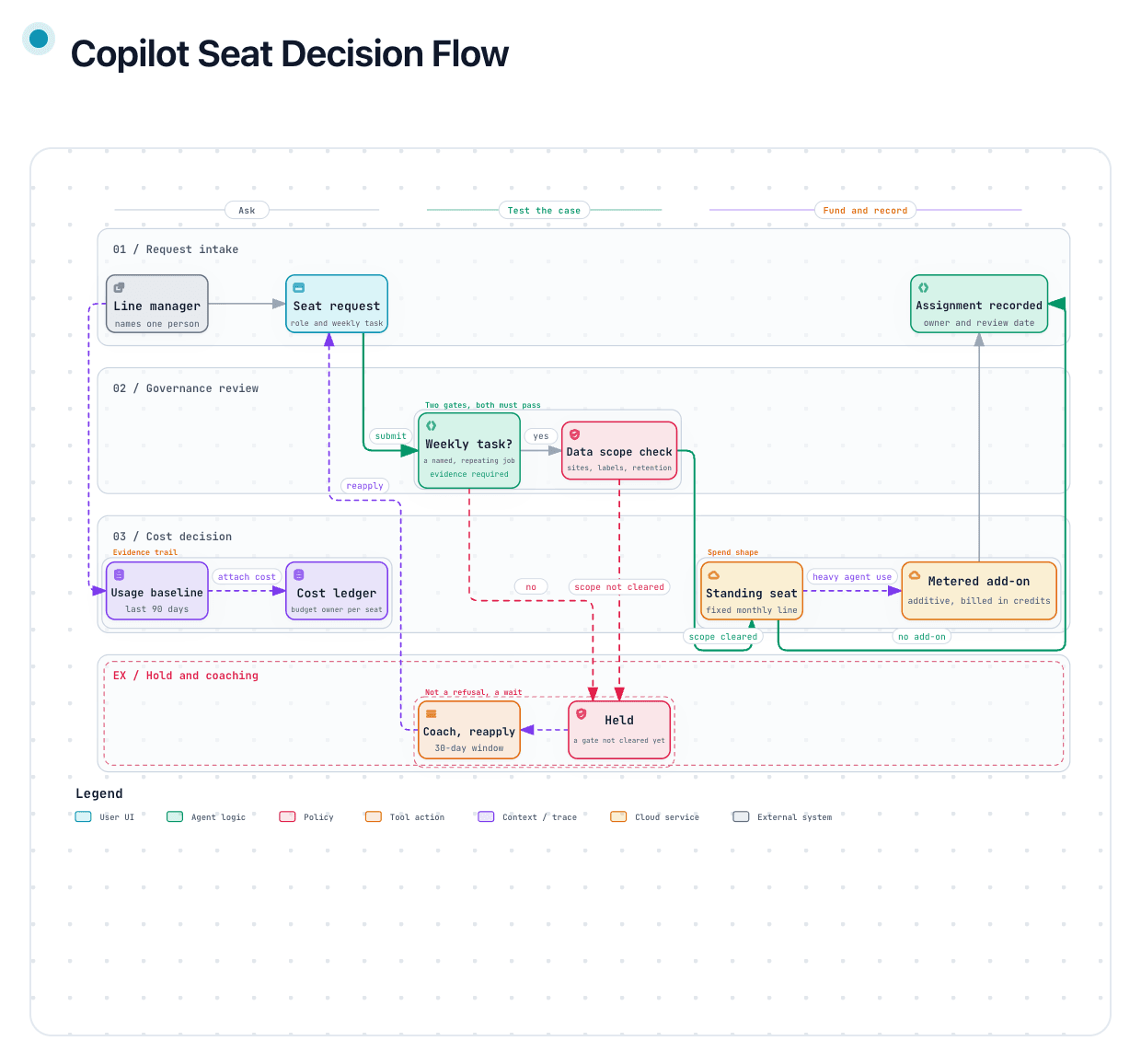
Most seat decisions are made in an email thread. Someone asks, a manager forwards it, an admin assigns it, and nine months later nobody can say who approved it or which budget line it lands on. This flow is the shape of the conversation that should have happened instead, drawn so it fits on one page and can be run live in a meeting rather than written as a policy nobody opens.
The exception lane is the part people skip and then regret. A request that fails the weekly-task gate is held with a coaching conversation and a thirty-day window, not refused. A refusal makes an enemy and produces a shadow workaround. A hold with a date produces a better request, and often no request at all, which is also a good outcome.
Deliberately free of rates. Published prices move, and a diagram with a stale number on its face is worse than one with none. Look the current rates up at the vendor, then use this to decide who should be generating them in the first place. Independent and not affiliated with, endorsed by or sponsored by Microsoft.
The pack adds the flow as an offline interactive page, a two-page print version, and a one-page worksheet you fill in per request: intake, both gates with their verdict boxes, the budget owner, the review date and the recorded outcome. The flow decides who holds a seat and who pays for it. It does not decide what the tool may be used for, and safety-critical authorization stays with the people who sign for it.
Want the prose behind the spend half of the figure? Copilot Credits and Capacity Packs, Explained covers what the metered layer actually meters, which features consume it, and the three ways it gets paid for.
Where to next, for you
Three picks that follow from this page.
Free next step
The Committee Brief Template
Two blank layouts for the hour before the meeting: the one-page brief and the follow-up sheet. Word and PDF, no signup.
Follows on from this page.
GoPaid option · $249
The Copilot Hardening Baseline + Deployment Kit
The two ends of a Copilot rollout: deploy first, harden second. $296 apart, $249 together.
Follows on from this page.
GoWorth a read
M365 Copilot costs in 2026: included vs metered
What is in the seat, what is metered, and how to charge it back.
Follows on from this page.
GoPicked from the pages you open here; that record stays in your browser and is never sent to us. .