Microsoft 365 Copilot · Free scorecard
The Copilot Rollout Readiness Scorecard
Eight boxes show you where your Copilot rollout is not ready.
One click, two tabs: the download page opens here, and the AI at Work signup (two issues a month, unsubscribe anytime) opens alongside. The scorecard is free; joining the list is the fair trade.
Page 1
The eight boxes
Someone can name who has a licence. Somebody has checked the SharePoint permissions everyone is assuming. There is a written answer to “did it read my private files”. The prompts you recommend live somewhere findable. Eight of these, each with what happens if it is not true.
Page 2
Which class, which fix
Your score, read: which gaps are execution and ownership, which live in the console, what fixes each class, and which to fix first.
The rule
Tick what is already true
Not what is planned. Under six ticks, and the thing slowing your rollout is not prompting.
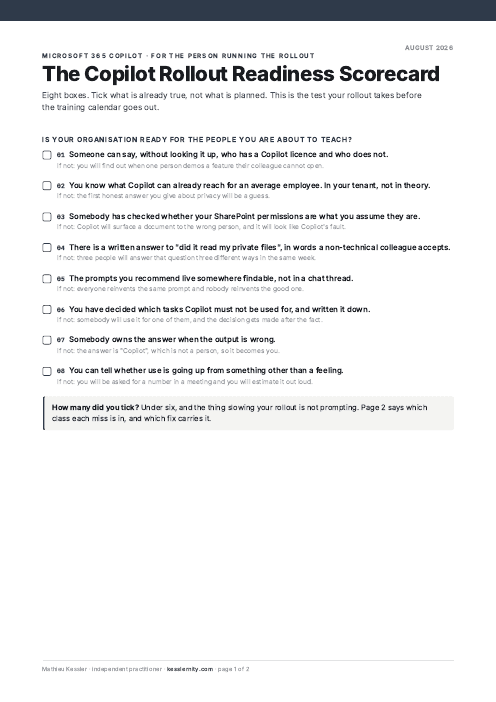
A rollout that trains prompting first finds out later whether prompting was ever the problem. Eight boxes tell you before the training calendar goes out. Who has a licence. What Copilot can already reach in your tenant. Whether SharePoint permissions match what everyone assumes. Whether anyone owns the answer when the output is wrong.
This is for the person other people’s Copilot use depends on.
Page 2 reads your score: which gaps are execution and ownership, which live in the console, what fixes each class, and which to fix first. Training does not close these gaps; it surfaces them.
Two pages, printable, free.
Where to next, for you
Three picks that follow from this page.
Free next step
Day-0 Readiness Gate
The checks to pass before the first licence is assigned. Free.
Follows on from this page.
GoPaid option · $249
The Copilot Hardening Baseline + Deployment Kit
The two ends of a Copilot rollout: deploy first, harden second. $296 apart, $249 together.
Follows on from this page.
GoWorth a read
Understanding Microsoft 365 Copilot: 2026 licensing reference
The licence tiers, what each includes, and what changed.
Follows on from this page.
GoPicked from the pages you open here; that record stays in your browser and is never sent to us. .