Microsoft, Mistral, OpenAI · Free 3-meter sheet
AI Seat Check
What are you paying per person for AI, across every vendor, and who owns each line?
One click, two tabs: the download page opens here, and the AI at Work signup (two issues a month, unsubscribe anytime) opens alongside. The sheet is free; joining the list is the fair trade.
The question
Per person, across all three
Most teams can answer this for one vendor. Almost nobody can answer it for Microsoft, Mistral and OpenAI at the same time, because each one bills differently and the invoices arrive in different places.
The sheet
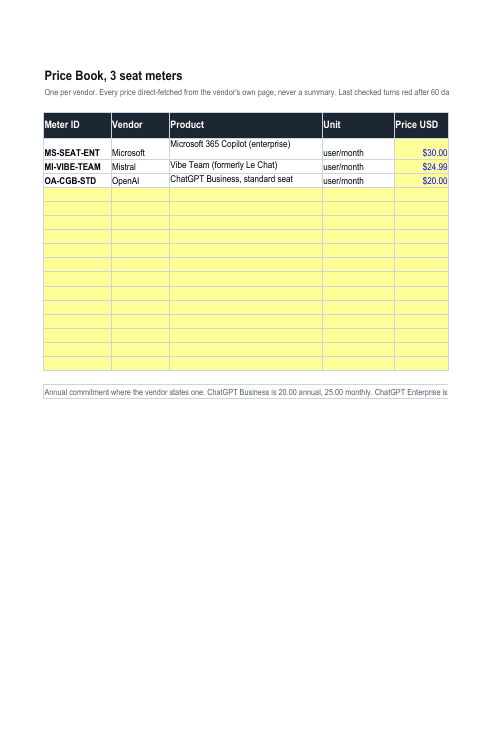
Three meters, each of them sourced
A per-person meter for each vendor, with the price, the link to the vendor’s own page and the date it was checked. Pick a meter, type how many seats and who owns the line, and read the total. A line with no owner is flagged.
The discipline
It tells you when it is stale
Every row carries its last-checked date and turns red after 60 days. A price nobody publishes is marked "not public" rather than estimated, which is the rule the full version runs on too.
Seats are the easy half of an AI bill and most teams still cannot total them. The hard half is tokens and credits, where a single Copilot credit has two purchase routes priced 25 percent apart and Microsoft does not publish what an action costs at all.
This sheet does the easy half properly, so you can see the shape of the problem before deciding whether the hard half is worth paying for. It is a working tool, not a locked demo, and it stays yours either way.
Three meters, three tabs, no macros. It opens in Excel and in Google Sheets.
Kesslernity is an independent practitioner, not affiliated with Microsoft, Mistral AI or OpenAI. Every price is the named vendor’s own published list price, linked and dated.
Where to next, for you
Three picks that follow from this page.
Free next step
Copilot, on one page
The loop to run when the answer matters, eight readiness boxes, and what to do about your score. Three pages, free.
Follows on from this page.
GoPaid option · $39
The Honest M365 Copilot Kit
Get genuinely good at Copilot, fast, and know when not to trust it.
15% off withHONESTQ4
Follows on from this page.
GoWorth a read
How to build your first prompt library
And why most teams should just take the free one.
Follows on from this page.
GoPicked from the pages you open here; that record stays in your browser and is never sent to us. .