Independent guide · Mistral Vibe · Free
Make Vibe useful at work
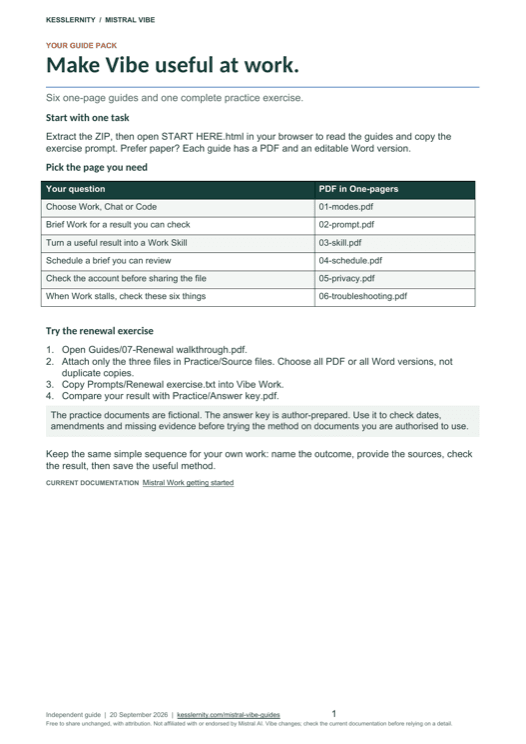
Six one-page guides for Mistral Vibe Work, plus a worked exercise with its answer key. Read them here; take the Word and PDF pack with you.
One click, two tabs: the download page opens here, and the AI at Work signup (two issues a month, unsubscribe anytime) opens alongside. The pack is free; joining the list is the fair trade.
01 · Modes
Choose Work, Chat or Code
Work for comparing documents, researching a topic, preparing a report or using connected business tools. Chat for a quick conversation or an existing Chat Agent. Agents remain a legacy Chat feature. Code for a terminal, editor, project or shell commands. Settings saved for Code do not configure Work.
02 · Briefing
Brief Work for a result you can check
Name the outcome, the audience and the sources. Ask for the filename, page or section and a short supporting quote on every finding, and for any date calculation to be shown. Separate confirmed terms from missing or conflicting information. A confident answer is not evidence.
03 · Skills
Turn a useful result into a Work Skill
Refine one real task until you would use the result, then ask Work to save the method. Write the description as a trigger, such as: use when reviewing a contract before renewal. After editing a Skill, start a new chat, because an active chat keeps the earlier version.
04 · Scheduling
Schedule a brief you can review
Scheduled tasks are in Public Preview and their triggers are time-based. They do not currently fire from an incoming email or a changed file. Run the prompt manually first and confirm future runs can reach updated material, because a one-off upload is not a live feed.
05 · Privacy
Check the account before sharing the file
The Vibe training opt-out and the Studio/API anonymous-improvement toggle are separate settings; one does not configure the other. Mistral says Connector-fetched data is excluded from training, while the conversation referencing it follows the account policy. Canvas sharing distributes the whole chat.
06 · Troubleshooting
When Work stalls, check these six things
Six symptoms mapped to the next action: the feature is missing, a file was ignored, the Skill is running old instructions, connected information is absent, a task is waiting for approval, a limit or service error appeared. A rewritten prompt cannot remove a service or account limit.
Plenty of Vibe advice stops at which model to pick. That is rarely the problem at work. The problem is that you have a contract, two amendments and a deadline, and you need an answer you can put your name to. These six pages are about that.
The pack also contains the exercise. Three fictional contract documents, a prompt to paste, and an answer key written before the model saw anything. Attach the three files, run the brief, then check what came back against the key: the dates, the arithmetic, which amendment replaced which term, and the schedule that is referenced but missing. If your result invents that schedule, you have just learned the most useful thing in the pack.
Written for the person who has been told to use it and has an actual deliverable due. No account required to read this page. The downloadable pack adds the Word versions, the printable PDFs, the practice documents and an offline reader that works with no connection.
Independent and not affiliated with or endorsed by Mistral AI. Every product claim is sourced to Mistral’s own documentation, checked on 20 September 2026. Vibe is moving quickly and parts of it are in Public Preview, so treat this as a dated snapshot and check the current documentation before you rely on a detail.
Working in the Vibe CLI rather than the browser? Mistral Vibe on one page covers that side, including how skills are discovered and why a correct file can fail silently.
Where to next, for you
Three picks that follow from this page.
Free next step
Mistral Vibe code skills, on one page
The four ways a skill fails silently, and what each one looks like when it happens. One page, free.
Follows on from this page.
GoPaid option · $29
When Not to Use AI
The judgment layer. Keep AI off the calls it should never make.
15% off withWHENNOT26
The judgment layer, whichever assistant is answering.
GoWorth a read
How to build your first prompt library
And why most teams should just take the free one.
Tool-agnostic, and it applies to what you just read.
GoPicked from the pages you open here; that record stays in your browser and is never sent to us. .