Which Microsoft AI agent tool do you actually need?
Agent Builder, Copilot Studio, and Microsoft Foundry Agent Service. Four questions, a decision tree you can screenshot, and what each one puts on IT’s desk.
Mathieu Kessler
Kesslernity · Published 24 August 2026
Three Microsoft products let you build an AI agent, and their names do almost nothing to tell them apart: Agent Builder, Copilot Studio, and Microsoft Foundry Agent Service. That third one was Azure AI Foundry until recently and still carries the old name in parts of Microsoft’s own documentation, which tells you how settled this is.
The real difference is not what the agents can do. It is who builds the thing and how much control they need over it.
Microsoft’s own guidance sorts on four factors: audience, reach, function, oversight. The four questions below cover the same ground and add the one Microsoft leaves out: who actually builds it.
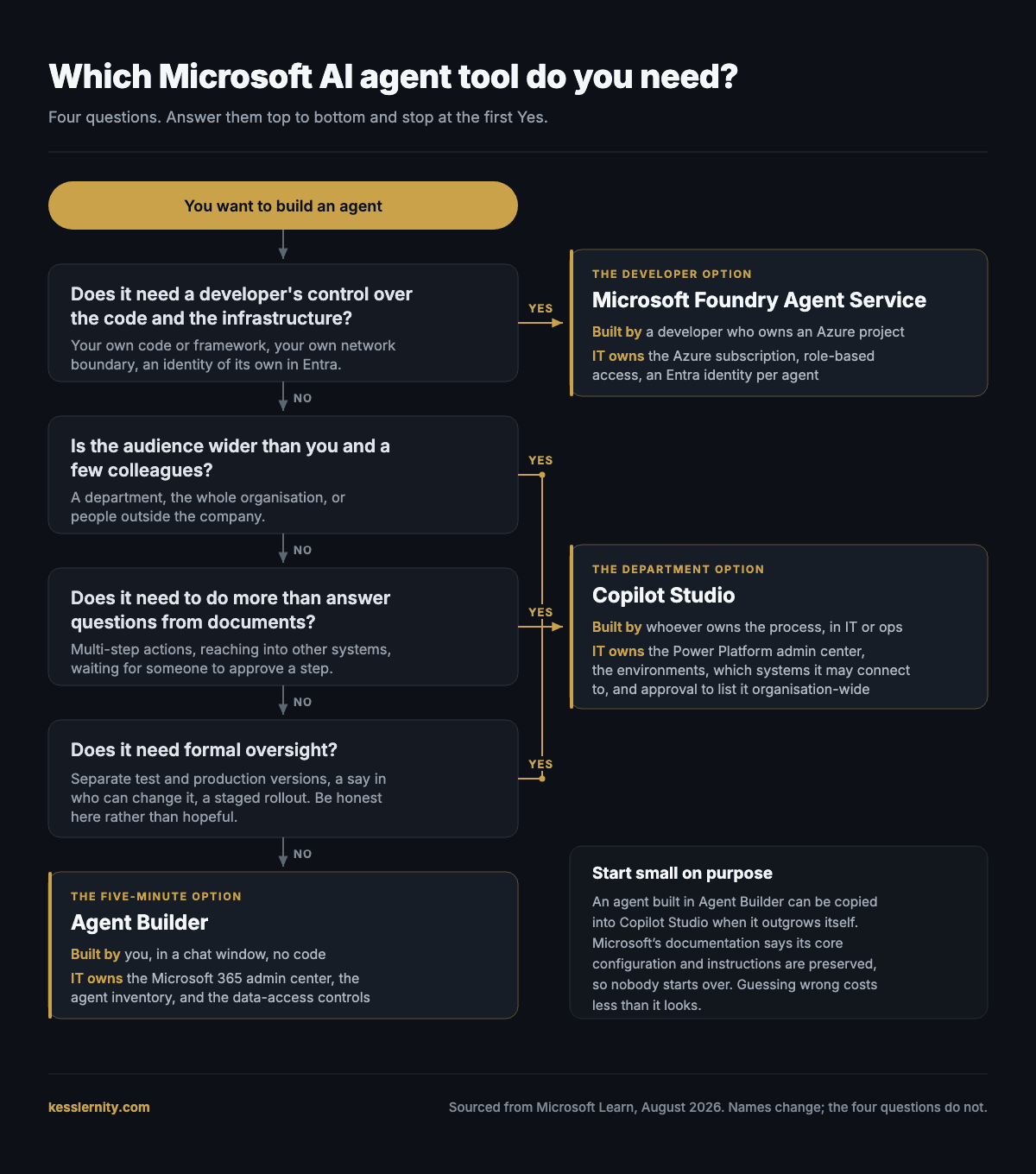
Who is building it?
You, in a chat window, with no code. Or an operations person who owns the process and needs it to do more than answer questions. Or a developer who needs control over the code and the infrastructure under it.
Who is it for?
Just you and a few colleagues. Or a whole department, the organisation, or people outside the company.
What does it need to do?
Answer questions from documents you already have. Or take multi-step actions, reach into other systems, wait for someone to approve a step.
Does it need formal oversight?
No, and be honest rather than hopeful. Or yes: separate test and production versions, a say in who can change it, a staged rollout.
Question one is the only route into Azure. If nobody needs control over the code and the infrastructure, Foundry is out whatever the other answers say. After that it is simple. Every answer the first option, and you can build this afternoon in Agent Builder. Anything else, and you are looking at Copilot Studio, so keep reading.
Agent Builder
It is built into Microsoft 365 Copilot and you set it up by describing what you want in plain language. It is for one person or a small team who needs an agent that answers questions from a set of documents. The catch is scope rather than capability: it grants no new privileges, so it only surfaces what the person asking could already open, which is reassuring only if your existing permissions are right. Build for free and the agent can read the public web and nothing else, so the moment it needs to open a file of yours you need a Copilot licence, Copilot Credits, or a pay-as-you-go plan.
Copilot Studio
This is the department option: broader publishing, multi-step logic, approval steps, and connectors into systems beyond Microsoft 365. It is for someone who owns a process rather than someone who owns code, though it rewards patience. It is also where governance stops being a setting and becomes a job: separate test and production versions, role-based access, and an administrator who has to approve anything published organisation-wide. The catch is that none of it helps unless someone is paid to run it, and a department that will not fund that is better off not starting here.
Microsoft Foundry Agent Service
This one sits a level up, in Azure rather than Microsoft 365, and it is where developers work. You choose your own model, can swap it later without rewriting the agent, bring your own code, and give each agent its own identity and network boundary. You reach for it when what you are building is software rather than a configuration, which is a different question from where the agent runs and a different question from which model it runs on. Copilot Studio already publishes to websites and custom endpoints, and Microsoft lists “advanced AI models and integration with Azure AI services” among what Copilot Studio supports. So neither reaching your customers nor wanting an advanced model is by itself a reason to be here. What is a reason is needing the code and the infrastructure to be yours. The catch is ownership: nobody maintains an Azure project by accident, so if you cannot name the team that still owns this in a year, you are not ready.
Whichever tool wins, it arrives in a console somebody has to keep. Here is what each one puts there, and the question worth asking before it does.
Agent Builder
It is administered mainly from the Microsoft 365 admin center, at Copilot > Agents, where you can view the inventory and enable, disable, assign, block or remove an agent, set pay-as-you-go billing, and enforce Purview sensitivity labels and audit logs. Microsoft’s position is that standard audit logs, activity reports and DLP and retention policies apply, which is worth reading precisely: agents inherit the policies you have already built, so they are exactly as governed as the rest of your tenant and not one bit more. Sharing is a separate control, at Copilot > Settings > Data access > Agents in the same admin center, and it is the page worth finding before people start building rather than after.
Ask this first. Not about the agent at all: whether your SharePoint, Teams and Outlook permissions are actually right, because “no new privileges” only ever repeats what those permissions already say.
Copilot Studio
This moves to the Power Platform admin center, and the controls get finer: data loss prevention, role-based access and auditing are enforced at the environment level rather than agent by agent. You decide which connectors exist, which is the control that matters most, because a connector is how an agent reaches a system outside Microsoft 365. Publishing to the organisation’s app catalogue needs your approval, and that is a real gate, but it is a gate on one route: agents can also be published to Teams, to a website, or to a custom endpoint, and shared directly with view or edit rights.
Ask this first. Who owns the environments, before the first agent rather than after, because an environment nobody owns is where development, test and production quietly become the same thing.
Microsoft Foundry Agent Service
Now you are in Azure, which means a subscription, Azure role-based access control, virtual network isolation, content filters, and a dedicated Microsoft Entra identity for each agent. That identity is the part to read twice: it is what makes an agent something you can grant, audit and revoke like any other principal, rather than a capability bolted onto a human account. And before you assume Azure stays in Azure, Foundry agents can be published into Microsoft 365 Copilot, Teams and the Entra Agent Registry, so an agent built in a console you do not own can turn up inside one you do.
Ask this first. Two people need naming before the first one is built, and they are usually not the same person: who owns the subscription, and who owns its bill.
This is the most useful section on the page for anyone who has been asked how many agents their organisation has. The Microsoft 365 admin center carries an agent registry, at Agents > All Agents > Registry: one list, sorted into Microsoft agents, partner-built agents, agents your organisation published, and agents shared by whoever made them. It filters by which platform built each agent and by which channel it is deployed to, exports to CSV with more than thirty fields per agent, and has a Microsoft Graph API in preview, which works with the AI Admin role, for anyone who would rather not click.
Two numbers on that page are worth more than the total. One counts agents whose owner has left the company. The other counts agents created or managed outside Agent 365, without its risk protection and observability. Read that second one twice, because it is tempting to treat it as a shadow-AI figure and it is not. It counts what sits outside Microsoft’s governance product, not what sits outside your organisation. Microsoft’s own risk taxonomy rates an agent with no registry entry, no owner or no Entra identity as critical, alongside an agent whose access rights exceed its declared function.
Three caveats before you promise anyone a single pane of glass. Microsoft gates the feature itself on what you are licensed for, so check the subscription before you build a governance process on top of it. The risk column shows only the high-severity risks the platforms underneath have already flagged, which is not the same thing as everything that is wrong. And the documentation does not say whether agents built in Foundry turn up here, so treat this as the Microsoft 365 inventory rather than the whole estate until you have checked your own tenant.
Guessing wrong costs less than it looks. An agent built in Agent Builder can be copied into Copilot Studio when it outgrows itself, and Microsoft’s documentation is explicit that its core configuration and instructions are preserved, so nobody starts over. The expensive mistake is not starting too small. It is commissioning a governed, developer-built agent for a job that eleven people were going to ask three questions a month.
| Tool | Best for | Who builds it | Where IT manages it |
|---|---|---|---|
| Agent Builder | You or a small team, questions about documents you have | You, no code | Microsoft 365 admin center |
| Copilot Studio | A department or outside customers, multi-step work with oversight | A process owner, or a developer | Power Platform admin center |
| Microsoft Foundry Agent Service | Agents that need their own code, network boundary and identity | A developer, and it has to be | Azure, role-based access on the subscription |
Agent Builder
- Best for
- You or a small team, questions about documents you have
- Who builds it
- You, no code
- Where IT manages it
- Microsoft 365 admin center
Copilot Studio
- Best for
- A department or outside customers, multi-step work with oversight
- Who builds it
- A process owner, or a developer
- Where IT manages it
- Power Platform admin center
Microsoft Foundry Agent Service
- Best for
- Agents that need their own code, network boundary and identity
- Who builds it
- A developer, and it has to be
- Where IT manages it
- Azure, role-based access on the subscription
Where this comes from
The tool comparison and the admin paths on this page come from three Microsoft Learn primary sources, fetched 23 and 24 August 2026, not from a search summary: the Agent Builder and Copilot Studio comparison, the Microsoft Foundry Agent Service overview, and the agent registry page in the Microsoft 365 admin center documentation. Where the page draws a conclusion Microsoft does not draw, it says so.
- Choose between Agent Builder and Copilot Studio →
- What is Microsoft Foundry Agent Service? →
- Agent Registry in Microsoft 365 admin center →
Names change and consoles move. If something here no longer matches what you see, the Microsoft page is right and this one is stale: tell me and I will fix it. Kesslernity is independent and is not affiliated with, endorsed by, or sponsored by Microsoft.
Field notes from real Copilot deployments.
What works, what costs more than expected, and the templates, every couple of weeks.
Where to next
Where to next, for you
Three picks that follow from this page.
Free next step
Mistral Vibe code skills, on one page
The four ways a skill fails silently, and what each one looks like when it happens. One page, free.
Follows on from this page.
GoPaid option · $39
Govern Your Agents
One agent, two governance problems. Naming the Swarm plus the Agent Instruction Block guide.
15% off withGOVERN26
Two governance problems on one agent: what it is called, and what it was told.
GoWorth a read
Copilot Studio pricing: credits, packs, and what agents cost
The reference for anyone building agents with a budget.
Follows on from this page.
GoPicked from the pages you open here; that record stays in your browser and is never sent to us. .